Winter Season Postcards

50 FREE!
Receive 50 FREE postcards with your first order!





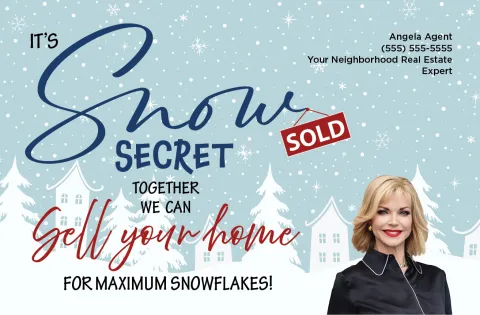

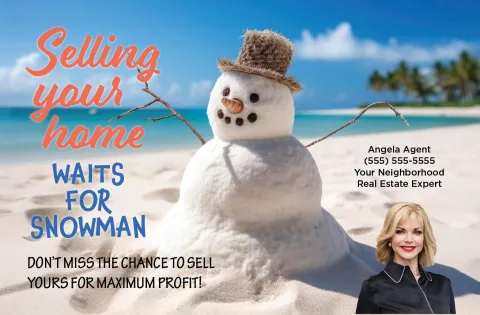
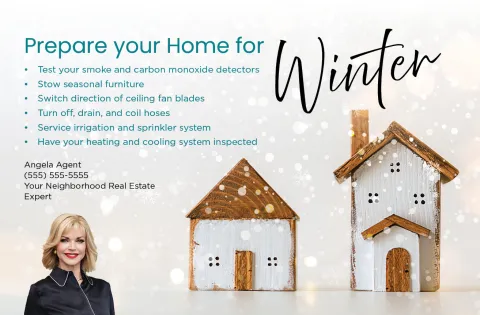
One all-inclusive price (+ free bonuses):
- Smart Targeted Mailing List
- Standard Class Postage and Delivery
- Professional-Quality Designs
- Bonus: Home Value Estimate QR Code
- Bonus: Fast Track Follow-Up
50 free with your first order!
$1.04 each
All–Inclusive, Transparent Pricing
Enjoy Personal Assistance
and Quality Control.
Jumbo - 8.5" x 5.5" (Standard Class Postage & Delivery )
50 FREE with First Purchase of 100 or more!
Volume Discounts
(Standard)
Quantity
Price Each
Volume Discounts
(Target Farming Agent - Extra 5¢ Off)
Quantity
Price Each
Volume Discount applies to the total quantity of eligible items in your shopping cart; items must be purchased during a single checkout session.
Frequently Asked Questions
Got more questions? Feel free to contact us for more information by clicking the link provided below.
We provide our Smart Targeted Mailing List with your postcards. It’s built using public data sources, such as tax roll and MLS data, to identify the most qualified homeowners in areas where transactions occur — down to the street, subdivision, or condo level — as well as similar surrounding areas.
By default, your postcards are mailed to homeowners (legal title holders). You can, however, choose to send to the property (situs) address instead, or to both. You may also upload your own mailing list by following the instructions and format requirements found in our Drag-and-Drop Postcard Editor.
To ensure accuracy and deliverability, all addresses are also CASS certified, meaning they meet the United States Postal Service guidelines. This helps reduce returned mail.
Uploaded lists must be in .csv (comma-separated values) format. Most programs — like Excel, FoxPro, and Outlook — allow you to export your list as a .csv file.
Your file should include the following column headers, in this exact order, in the first row: LastName, FirstName, SpouseName, Street, City, State, Zip. All fields are required, except “SpouseName” (spouse’s first name only).
Note: If your list combines first and last names into a single column, enter the full name in the “LastName” column.
We build our Smart Targeted Mailing List using public data sources, like tax roll and MLS data, to identify the most qualified homeowners. Our system targets areas where transactions occur — down to the street, subdivision, or condo level — as well as similar surrounding areas, rather than using a simple radius.
To ensure accuracy and deliverability, all addresses are also CASS certified, meaning they meet the United States Postal Service guidelines. This helps reduce returned mail.
You’ll also need to add the other agent’s name and contact information here: Account Profile > Personal Settings.
If you’d like to add another agent’s photo, name, and contact information to your postcard while editing it, simply access the Components menu. Then, drag and drop the Contact Photo module and Contact Details module onto your postcard. You can click each module on the card to customize it. If you’re having any issues uploading the photo yourself, please email postcardadmin@rspusa.com.
NOTE: Final costs for postcard orders can also be split between agents.
We automatically mail all postcards via the U.S. Postal Service with Standard Class (Bulk/Business) Postage. which averages 10-15 business days for delivery. You may request an upgrade to First-Class Presort, which takes five to seven days, for an additional charge.
NOTE: If you wish to avoid the additional postage upgrade charge, you may order postcards at our Small size (4" x 6"). These are mailed First-Class Presort by default.
To ensure accuracy and deliverability, all addresses on your mailing list are CASS-certified, meaning they meet United States Postal Service guidelines. While this process helps reduce returned mail, it is not perfect — our CASS accuracy rate averages over 98%, so a small number of addresses may still be incorrect.
If you choose to mail with First-Class Postage, returns may also occur when there is no forwarding address on file or when a forwarding request has expired.
Once they scan the code, homeowners see an estimate of their home’s value via a custom landing page on MyHomeEst.com. Then, a qualified digital lead is created in real time, including the homeowner’s name, property address, and phone/email, as available. You’re instantly notified of the lead (and all the info) by email and text message and have the opportunity to follow up on your own or with our automated service, Fast Track Follow-Up.
If ordering non-addressed postcards, manually entering addresses into your mailing list, or uploading your own mailing list, only one code will be used for all recipients, and you will not receive a notification. In this case, recipients will be prompted to enter their address to receive an estimate.
In non-disclosure states, an estimate will not be provided. Instead, the list price trend for the county will be shown, as well as a list of similar listed or sold properties on the market. In place of the estimate will be a call-to-action prompting the homeowner to reach out to you as the Local Real Estate Specialist.
Our printers are professionally calibrated to produce the highest possible print quality. Even so, printed colors may vary slightly from what you see on your monitor or home printer due to differences in screen settings, print technology, and paper absorption.
Most of the newer postal machines, however, automatically adjust the settings in the machine or flag irregularities if they detect that something is off. Typically, only a few postcards would go through before an issue is detected, so most of your order would likely be unmarked.
- The billing or shipping address associated with your order.
- The type of item or service purchased.
We reserve the right to adjust the tax charged on your order if additional tax becomes due or if an error in the estimated tax is identified.